title: Common workflows description: Practical WebUI workflows for operators: create boundaries, enroll components, and troubleshoot.
This page focuses on repeatable operator workflows in WebUI.
Workflow 1: Create group and network boundary
- Open Networks and create a network with non-overlapping CIDR.
- Attach the network to the intended ownership boundary for your team or environment.
- Verify the network appears under the expected section in the product UI.
Diagram (text)
Ownership boundary chosen -> network created -> future nodes inherit the expected context
Workflow 2: Register gateway control components
- Use the supported community or hosted enrollment flow for the gateway services.
- Verify the gateway control service appears in Agents.
- Verify the gateway runtime appears in Gateways with healthy status.
Checks
- heartbeat timestamps update,
- runtime metadata (OS/interfaces) is present,
- region assignment matches your topology.
Workflow 3: Add a node and connect with CLI
- Open Nodes and click Add node.
- Choose Device or Server, then choose CLI.
- Follow OS-specific install/auth/connect instructions.
- Verify runtime with
nanami status,nanami doctor, andnanami watch.
Detailed onboarding guide:
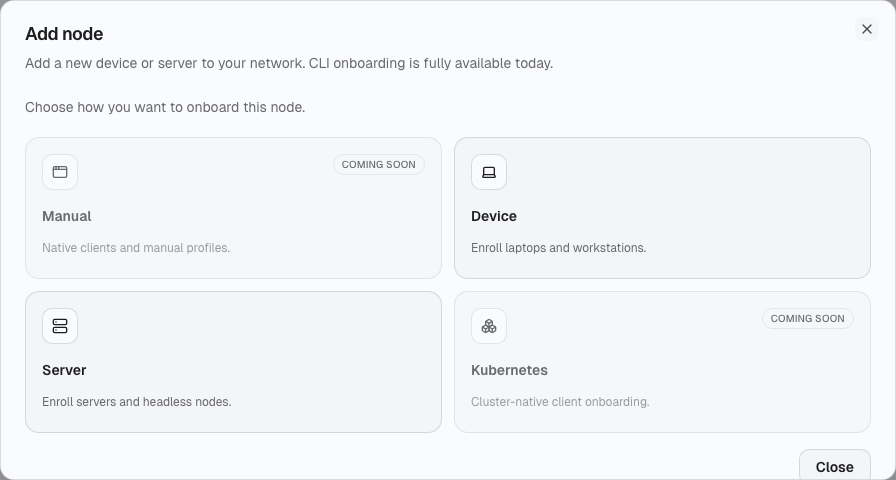
Workflow 4: Validate routing behavior
- Confirm the network routing policy (auto/manual, vpn_only/full_tunnel).
- Verify ingress/egress device selection where applicable.
- Check tunnel counters and handshake recency.
Workflow 5: Incident triage path
- Start at Dashboard for broad impact.
- Check Gateways and Agents for control/runtime drift.
- Inspect affected Nodes and Tunnels.
- Review recent policy or access-scope changes.
- Roll back risky changes before introducing new ones.
Operational tips
- Keep naming and labels consistent across teams.
- Roll out network and routing changes in phases.
- Keep one known-good gateway path during major migrations.